Catch Every Important Change in Your Database
Turn any SQL or NoSQL query into smart alerts for your business. Monitor PostgreSQL, MongoDB, MySQL, BigQuery, Redshift and more.

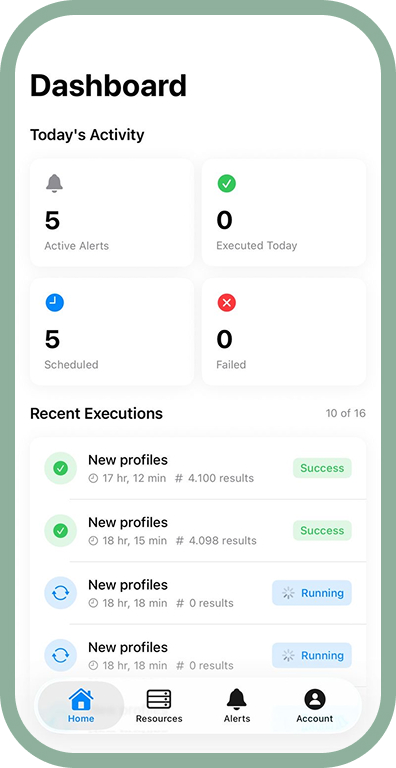
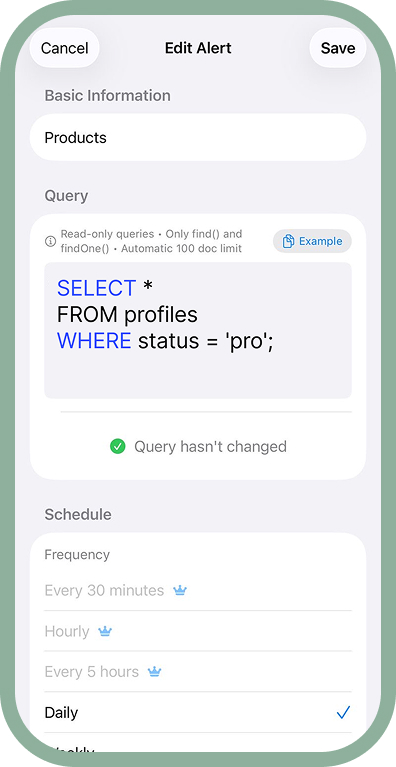
Turn any SQL or NoSQL query into smart alerts for your business. Monitor PostgreSQL, MongoDB, MySQL, BigQuery, Redshift and more.
Write & test SQL/NoSQL queries
Run every few minutes, hours or days
Connect all your databases
Push, Email, Slack & Webhooks
Read-only queries, encrypted
Full SQL support
NoSQL queries
Standard SQL
Google Cloud analytics
AWS data warehouse
Microsoft database
Enterprise database
MySQL compatible
Query Alert is an iOS app that transforms any SQL or NoSQL query into smart business alerts. Connect to your databases (PostgreSQL, MongoDB, MySQL, BigQuery, Redshift, SQL Server, Oracle, and more), write your queries, and receive notifications when your data changes. Perfect for developers, data analysts, and business professionals who need to stay on top of important data changes.
Setting up an alert is simple: 1) Add your database connection (we support PostgreSQL, MongoDB, MySQL, BigQuery, Redshift, and more). 2) Write your SQL or NoSQL query to check for the condition you care about. 3) Set your schedule (every few minutes, hours, or days). 4) Choose how you want to be notified (push notification, email, Slack, or webhook). The app will automatically run your query and alert you when results are found.
Query Alert supports a wide range of SQL and NoSQL databases including PostgreSQL, MongoDB, MySQL, MariaDB, BigQuery, Redshift, SQL Server, Oracle, and more. We're constantly adding support for new database types. Each connection is encrypted and secure.
You can schedule your queries to run automatically at various intervals: every few minutes for critical monitoring, hourly for regular checks, daily for summary reports, or on any custom schedule that fits your needs. The app runs queries in the background and only alerts you when conditions are met.
Query Alert offers multiple ways to stay informed: Push notifications directly to your iPhone, email alerts for detailed reports, Slack integration for team notifications, and webhook support for custom integrations with your existing tools and workflows. You can configure different notification methods for different alerts.
Absolutely. Security is our top priority. All database connections use encrypted protocols (SSL/TLS). We recommend using read-only database credentials for additional safety. Your connection details are stored securely on your device and are never shared with third parties.
Yes! Query Alert allows you to connect and monitor multiple databases simultaneously. This is perfect for developers and teams managing multiple projects, staging and production environments, or different database types for various use cases.
You can run any read-only query that your database supports. Common use cases include: checking for new records (new user signups, new orders), monitoring data thresholds (inventory levels, error counts), validating data integrity, and tracking business metrics. The app supports both simple SELECT queries and complex aggregations.
Yes! Query Alert runs scheduled queries in the background according to your configured schedules. You'll receive notifications even when the app isn't actively open. For time-sensitive alerts, we recommend enabling background app refresh in your iOS settings.
Query Alert supports iPhone and iPad devices running iOS 17.0 or later. The app is optimized for the latest iOS features and provides a native, responsive experience on all modern Apple devices.
Query Alert is free to download with core features available. Premium features for advanced scheduling, unlimited database connections, and priority support are available via in-app subscription. Try the app first to see if it fits your workflow.